
Create Stunning Visual Displays with Vibrant Gradient Effects
Transform Your Digital Signage Displays with the Gradient Widget
The Gradient Widget in Studio.Amsdin.com is a powerful design feature that allows digital signage creators to build smooth, visually engaging color transitions for their layouts. By blending two colors across the screen with precision control, the widget enhances the visual depth of digital displays, improves readability, and delivers a clean, modern aesthetic ideal for retail, corporate, hospitality, and commercial environments. As part of Amsdin’s advanced digital signage software platform, it ensures your screens remain vibrant, professional, and timeless.
Key Features of the Gradient Widget
- Customizable Color Stops: Choose any combination of colors—single, dual, or multiple—to create unique blended visuals that match your theme or branding.
- Directional Control: Select vertical, horizontal, or custom blending directions depending on the layout style you want to achieve.
- Transparency Support: Add transparency levels to create layered effects behind text, icons, or images.
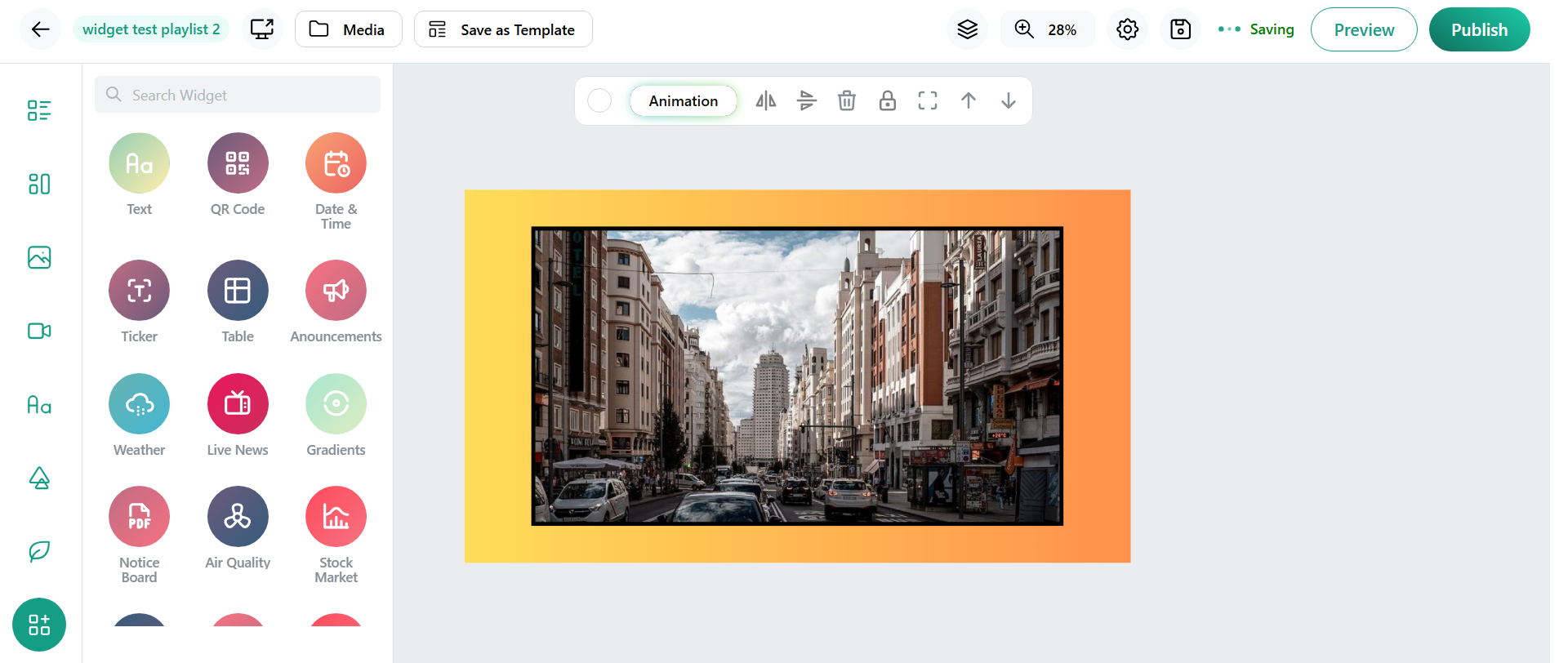
- Canvas-Friendly Editing: Even though gradients don’t appear during editing, the layout stays clean, and the full gradient effect displays accurately during preview or on actual screens.
- Seamless Widget Integration: Use gradients as backgrounds, highlight sections, or overlay components without disrupting other widget functionality.
- Performance-Optimized: The system ensures smooth rendering, even on long-running digital signage hardware.
- Brand Matching Palettes: Choose preset color themes or create your own brand-specific gradient transitions for consistency across locations.
- Responsive and Flexible: Works perfectly across various screen sizes, orientations, and resolutions.
Benefits for Businesses and Organizations
- Enhanced Visual Impact: Smooth color transitions create a modern and engaging design that captures viewer attention instantly.
- Improved Readability: Subtle color blends help text and important messages stand out more clearly.
- Consistent Branding: Custom colors let you maintain brand identity across multiple screens and outlets.
- Versatile Usage: Suitable for product promotions, announcements, lobby displays, menu boards, events, and more.
- Professional Aesthetic: Gives your layouts a sleek, high-tech appearance that elevates your digital signage presence.
- Easy Editing Workflow: Quickly adjust colors, directions, and animations without needing a designer.
- Multi-Location Control: Deploy the same gradient theme across branches for a unified brand appearance.
- Low-Cost Visual Upgrade: Change layouts visually without redesigning everything from scratch.
How the Gradient Widget Works
- Log in and open your layout editor.
- Choose whether your canvas vertically, horizontally, or through a custom.
- Select the Gradient Widget from the widget panel.
- Pick one or many gradient colors using the color selector.
- Add content like images, videos and more according to your design needs.
- Click preview to see the gradient fully rendered exactly as it will appear on the display.
- Publish your layout to push the gradient background to connected screens.
Conclusion
The Gradient Widget provides a simple yet powerful way to elevate digital signage visuals through smooth color blending and customizable directional flow. Even though the gradient doesn’t appear directly on the canvas during editing, the preview accurately shows the final result, ensuring consistency between design and display. With its flexibility, ease of use, and brand-aligned color control, the Gradient Widget is an essential tool for anyone looking to create polished, modern, and engaging digital signage content.