
Enhance Digital Signage with the Audio Player Widget for Engaging Multimedia Displays
Enhance Your Digital Signage Experience with the Audio Player Widget
The Audio Player Widget is a powerful feature within Studio.Amsdin.com that enables creators to add rich, immersive sound to their digital signage layouts. Whether you want to play background music, narrations, welcome messages, promotional audio, or ambient soundscapes, this widget brings your screens to life with high-quality audio support. Perfect for retail stores, receptions, events, hotels, gyms, and interactive environments, it creates a more engaging experience by combining visuals with audio.
By supporting seamless playback directly within the layout editor, the Audio Player Widget makes it easy for designers to upload, manage, and preview audio files without additional tools. You can enhance your digital displays by layering your content visually while allowing the audio to play behind text, videos, animations, or promotional banners—giving your signage a professional, multimedia feel.
Key Features of the Audio Player Widget
- Supports Any Audio Type: Upload and use music, voiceovers, speeches, announcements, ambient sound, jingles, or tunes—completely flexible for any industry.
- Full Playback in Canvas: Once the audio is selected or uploaded, it immediately begins playing inside the canvas so you can hear it while designing.
- Directional Layout Selection: Choose vertical, horizontal, or custom layout views before placing the audio widget to match your preferred editing style.
- Simple Upload & Apply: Upload audio files directly from your device or select from your library, then instantly apply them to the layout.
- Play Behind Visual Content: Audio runs in the background while other content—images, videos, tickers, slideshows, or widgets—continues playing seamlessly.
- Continuous Background Audio: Ideal for looping background music or long audio tracks that enhance the overall atmosphere of your display.
- No Technical Skills Required: A simple, user-friendly interface allows anyone to add audio without editing tools or coding.
- Optimized for All Signage Screens: Works smoothly on kiosks, LED displays, indoor standees, menu boards, and more.
- Performance Efficient: Designed to run audio without affecting layout transitions or screen performance.
Benefits for Businesses and Organizations
- Immersive Viewer Experience: Combining visuals with audio creates stronger emotional engagement and helps deliver messages more effectively.
- Professional Presentation: Background audio instantly elevates the perceived quality of your signage, making it more dynamic and appealing.
- Brand Mood Setting: Music or tone selection helps reinforce brand identity—upbeat for retail, soft for hospitality, motivational for gyms, etc.
- Increase Viewer Retention: Audio attracts attention and keeps viewers focused longer, enhancing the impact of your content.
- Perfect for Announcements: Automated verbal messages or periodic announcements replace manual announcements in busy environments.
- Flexible for Any Industry: Retail promotions, restaurant ambience, corporate lobby greetings, event countdowns, and more.
- Easy to Update: Swap audio files anytime without redesigning your layout.
- Cost-Effective Enhancement: A powerful way to refresh your signage without purchasing new design assets.
How the Audio Player Widget Works
- Select the layout orientation—vertical, horizontal, or custom—before adding the widget.
- Click the Audio Player Widget from the widget panel.
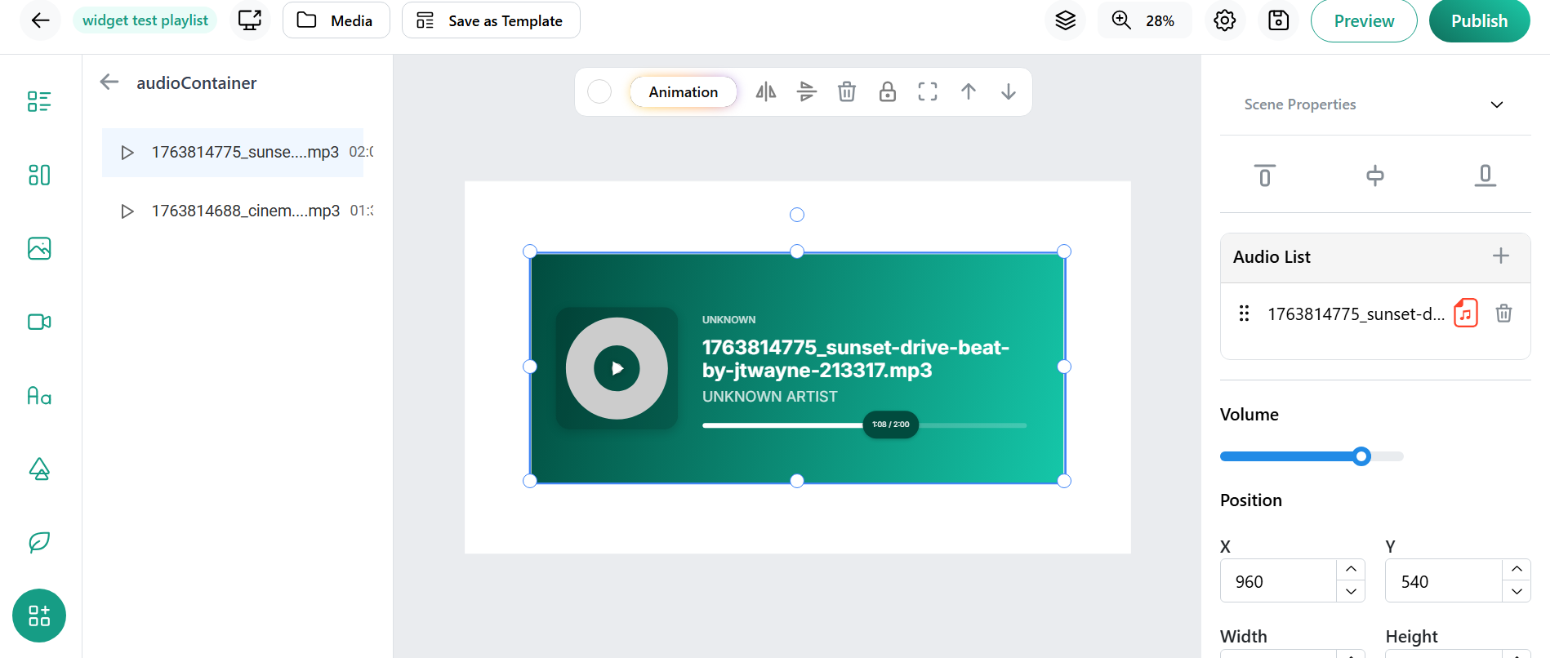
- Upload your audio file or choose an existing one from your media library.
- Select the audio to apply it into your layout.
- The audio will immediately start playing inside the canvas so you can hear the effect.
- Add any visual content on top—images, sliders, text, videos, or widgets—while the audio continues playing behind them.
- Preview your layout to test the full audio-visual combination.
- Publish your layout to broadcast both audio and content on your screens.
Conclusion
The Audio Player Widget is an essential tool for creators who want to take their digital signage to the next level. By seamlessly integrating audio with visual layouts, it delivers a richer, more memorable experience for viewers. Whether you're enhancing ambience, reinforcing brand identity, or delivering clear spoken messages, the widget provides unmatched flexibility and simplicity. With its ability to play audio behind content and preview sound directly inside the editor, the Audio Player Widget transforms ordinary screens into powerful multimedia displays—making your digital signage more engaging, professional, and dynamic.