
How the Presentation Widget Works in Digital Signage | Create Slideshows with Images, Videos & PDFs
Presentation Widget for Digital Signage Software: How It Works, Features & Use Cases
Digital signage software has transformed the way businesses and organizations communicate visually. Among the many powerful tools available, the Presentation Widget stands out for its ability to showcase mixed media content—images, videos, and PDF slides—inside a single, cohesive presentation.
Whether you're running a retail promo, a corporate briefing, a product showcase, or an educational announcement, the Presentation Widget allows you to deliver dynamic and visually appealing content with ease.
In this blog, we’ll explore what the Presentation Widget does, how it works, its key features, and where it can be used effectively.
What Is the Presentation Widget?
The Presentation Widget is a versatile tool in digital signage software that lets users create slideshow-like presentations by combining multiple media types—including images, videos, and PDF files. Instead of managing separate widgets for each file, this widget simplifies setup by allowing all content to be placed within one presentation container.
This widget is ideal for businesses that want a clean, organized flow of content with automated transitions and smooth playback.
How the Presentation Widget Works
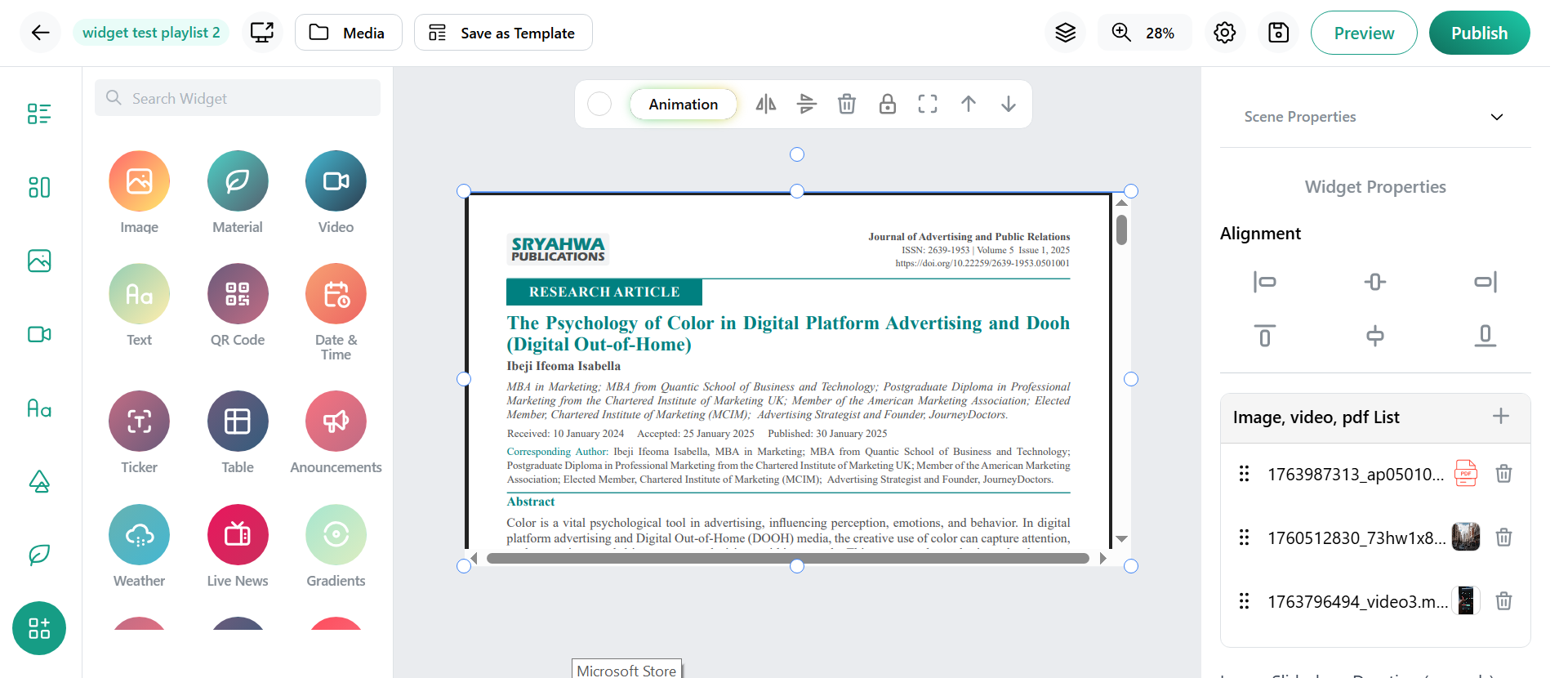
Here are the simple, step-by-step instructions for using the Presentation Widget:
- Go to the editor in your digital signage software.
- Select the Presentation Widget from the widget selection panel.
- Add your media files—choose any combination of images, videos, or PDF documents.
- Click on Preview to see how the presentation plays on screen.
- Publish the layout to display your presentation live on digital signage screens.
This easy workflow helps anyone create professional, polished presentations in minutes.
Key Features of the Presentation Widget
- Multi-Format Support
Combine images, videos, and PDFs in one seamless presentation—perfect for dynamic storytelling.
- Adjustable Slide Duration
Control how long each slide stays visible for a smooth, well-timed presentation.
- Automated Transitions
Slides change automatically, creating a hands-free display ideal for digital signage environments.
- Custom Layout Placement
Fit the presentation into vertical, horizontal, or custom screen layouts with drag-and-resize tools.
- Easy Content Updates
Quickly add, remove, or rearrange slides without altering the full screen layout.
Popular Use Cases for the Presentation Widget
- Retail & Shopping Malls
Showcase product highlights, promotional offers, and brand stories in a rotating slideshow.
- Corporate Offices
Display important announcements, performance reports, onboarding information, and company updates.
- Education & Training Centers
Share timetables, event slides, training modules, and student achievements.
- Restaurants & Cafés
Use a presentation to cycle through menu images, combo offers, and food promotions.
- Healthcare Facilities
Display doctor schedules, facility updates, health awareness content, and service highlights.
Benefits of Using the Presentation Widget
- Delivers smooth, engaging visual content
- Simplifies media mixing inside a single widget
- Saves time by reducing manual content arrangement
- Provides professional transitions without graphic design tools
- Works for corporate, retail, education, healthcare, and events
Conclusion
The Presentation Widget is a powerful tool for creating impactful, multi-media visual content in digital signage software. Its ability to combine images, videos, and PDFs into one organized presentation makes content delivery efficient and visually appealing. Whether you're designing displays for retail, corporate communications, education, or events, this widget makes it easy to create polished presentations that capture attention and deliver clear messages.