
Embed Google Slides in Digital Signage: Google Slide Widget Explained
Google Slide Widget for Digital Signage Software: How It Works, Features & Use Cases
Digital signage continues to evolve with flexible tools that allow businesses, schools, offices, and organizations to present information quickly and visually. One of the most powerful additions to modern signage platforms is the Google Slide Widget—a feature that lets you display live Google Slides presentations directly on your digital screens.
This widget makes it incredibly easy to update content remotely, collaborate with teams, and display clean, professional presentations without needing to manually upload files each time.
In this blog, we’ll explore what the Google Slide Widget offers, how it works, and why it’s an essential tool for dynamic display content.
What Is the Google Slide Widget?
The Google Slide Widget is a built-in feature within digital signage software that allows users to embed and display Google Slides presentations on screen layouts. Instead of exporting slides as images or videos, users can simply publish their Google Slides to the web and paste the generated link into the editor.
This ensures your digital signage content stays instantly updated, highly collaborative, and easy to manage from anywhere.
How the Google Slide Widget Works
Here is the simple step-by-step process of how the widget works:
- Create or choose your Google Slides presentation that you want to display.
- Click on File → Share → Publish to web → Publish inside Google Slides.
- Copy the generated public URL after publishing.
- Login to your digital signage editor and go to the layout where you want to display the slide.
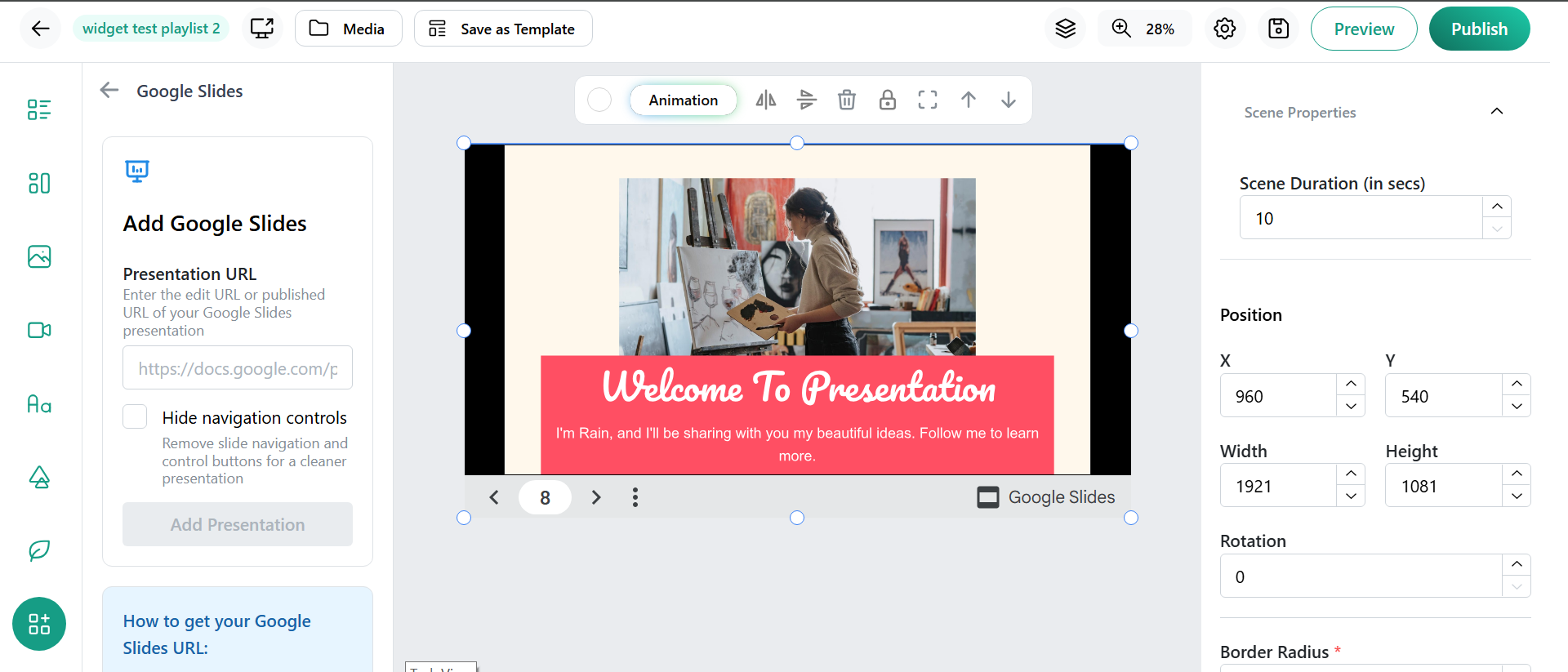
- Select the Google Slide Widget from the widget selection panel.
- Paste the copied Google Slide URL into the widget input field.
- Click on “Add Presentation” to embed your slides.
- Click “Preview” to see how your Google Slides appear on the digital signage screen.
- Publish the layout to display the presentation live.
This smooth and fast workflow helps you publish presentations on multiple screens within minutes.
Key Features of the Google Slide Widget
- Real-Time Updates
Any edits you make in Google Slides automatically reflect on your digital signage after publishing—no re-uploading needed.
- Collaborative Editing
Multiple team members can edit the presentation simultaneously in Google Slides, making content creation efficient and unified.
- Smooth Slide Transitions
The widget supports smooth automatic transitions, making your on-screen content visually appealing and professional.
- Flexible Layout Integration
You can place the widget in any layout—vertical, horizontal, or custom—and resize it to fit your design.
- No File Upload Requirements
Instead of uploading PDFs or PPTs, you simply paste a link, reducing file handling and screen setup time.
Popular Use Cases for the Google Slide Widget
- Education
Schools and colleges use Google Slides for timetables, announcements, events, and classroom presentations.
- Corporate Offices
Companies display dashboards, meeting schedules, onboarding slides, project updates, and weekly reports.
- Retail & Shopping Malls
Use slides to present promotional offers, product features, brand stories, and rotating banner slides.
- Healthcare Facilities
Hospitals can present health tips, doctor schedules, facility updates, and awareness content.
- Events & Conferences
Present event agendas, speaker details, and session highlights directly through Google Slides.
Benefits of Using Google Slides in Digital Signage
- Makes updating content extremely fast and easy
- Ensures high content accuracy and consistency
- Supports remote content editing from any device
- Enables team collaboration from different locations
- Helps deliver visually clean, professional content without design tools
Conclusion
The Google Slide Widget is one of the most efficient and user-friendly tools available in digital signage software. It lets you display live presentations effortlessly, update content instantly, and collaborate with teams in real time. Whether used for education, retail, corporate communication, events, or healthcare, this widget enhances the quality and flexibility of your digital displays.