
Digital Notice Board Widget with File Upload: Enhance Communication and Engagement
Revolutionizing Communication: Notice Board Widget with File Scrolling
Digital signage is an essential tool for dynamic communication across organizations of all types. A Notice Board Widget that supports uploading Files with scrolling offers a seamless solution for displaying detailed documents, bulletins, and announcements on digital displays. This functionality replaces outdated printed notices with vibrant, continuously updating content.
Revolutionizing Communication: Notice Board Widget with File Scrolling
Digital signage is an essential tool for dynamic communication across organizations of all types. A Notice Board Widget that supports uploading Files with scrolling offers a seamless solution for displaying detailed documents, bulletins, and announcements on digital displays. This functionality replaces outdated printed notices with vibrant, continuously updating content.
What is a Notice Board Widget with File Upload and Scrolling?
This widget allows users to upload Files files containing announcements, schedules, policies, or any relevant documents directly to the digital signage system. Instead of showing just one static page, the widget scrolls through multiple pages of the Files either vertically or horizontally, making all content visible to viewers without manual intervention.
Key Features
- PDF Upload: Easily upload PDF files from your device or cloud storage to the notice board.
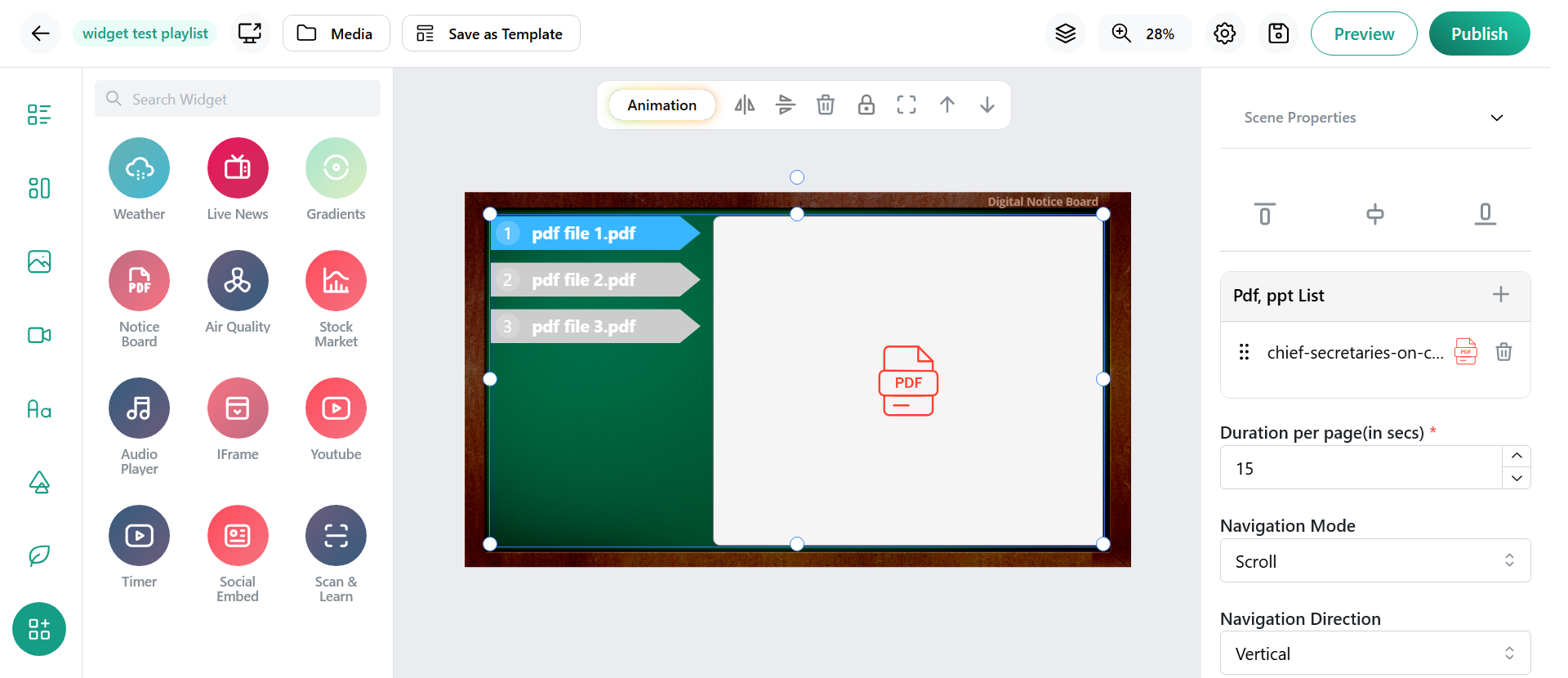
- Auto Scrolling: Set vertical or horizontal scrolling to navigate through multi-page documents smoothly and continuously.
- Customizable Scroll Speed and Direction: Adjust how fast and in what direction the PDF scrolls to suit your viewing environment.
- Page Duration Settings: Optionally set the time duration for each page before scrolling to the next.
- Remote Content Management: Update PDFs anytime from a cloud-based content management system, ensuring real-time refresh without physical access.
- Responsive Display: Optimized for various screen sizes and resolutions to maintain readability.
Benefits for Your Organization
- Significant reduction in paper use and manual updates.
- Continuous visibility of all document contents in an engaging, readable format.
- Perfect for schools, corporate offices, hospitals, and event venues needing to share detailed notices.
- Streamlined workflow by centralizing content updates and scheduling.
- Improves audience engagement through smooth, uninterrupted viewing experience.
How to Use the Widget Effectively
- Upload your PDF document via the content platform to the notice board widget.
- Configure scrolling parameters such as speed, direction, and page duration.
- Use manual content updates to replace or remove outdated documents whenever necessary.
- Preview the scrolling PDF on your layout to ensure readability.
- Publish updates instantly, reaching your audience across connected displays.
Conclusion
A Notice Board Widget with File upload and scrolling transforms static information boards into interactive, dynamic tools for effective communication. It streamlines message sharing and ensures comprehensive visibility of important documents with minimum effort. Embrace this technology to modernize your communication and boost engagement with your audience.