
Transform Data Display: Table Widget in Studio.Amsdin.com with Seamless Excel Upload & Scrolling View
Streamline Data Presentation with the Table Widget
The Table Widget empowers digital signage users to display structured data elegantly and interactively on screens. By uploading Excel files, you can convert complex data into an easy-to-read, scrollable table format — perfect for schedules, product lists, event details, or any tabular data that needs clear visual communication.
Key Features of the Table Widget
- Excel Upload: Directly upload Excel (.xls, .xlsx) files to populate tables without manual data entry.
- Smooth Scrolling: Long tables scroll vertically or horizontally to fit any screen size, maintaining legibility and aesthetic appeal.
- Customizable Columns and Rows: Adjust column widths, sort orders, and row heights to optimize reading experience.
- Dynamic Updates: Replace Excel files at any time to refresh the displayed data instantly across all screens.
- Responsive Design: Automatically adapts table layout for different resolutions and screen orientations.
- Styling Options: Customize fonts, colors, and borders to align with your brand identity and signage themes.
- Multi-Screen Support: Deploy consistent table views across multiple displays, locations, or events.
How to Implement the Table Widget
- Access Studio.Amsdin.com Dashboard: Log into your digital signage management dashboard.
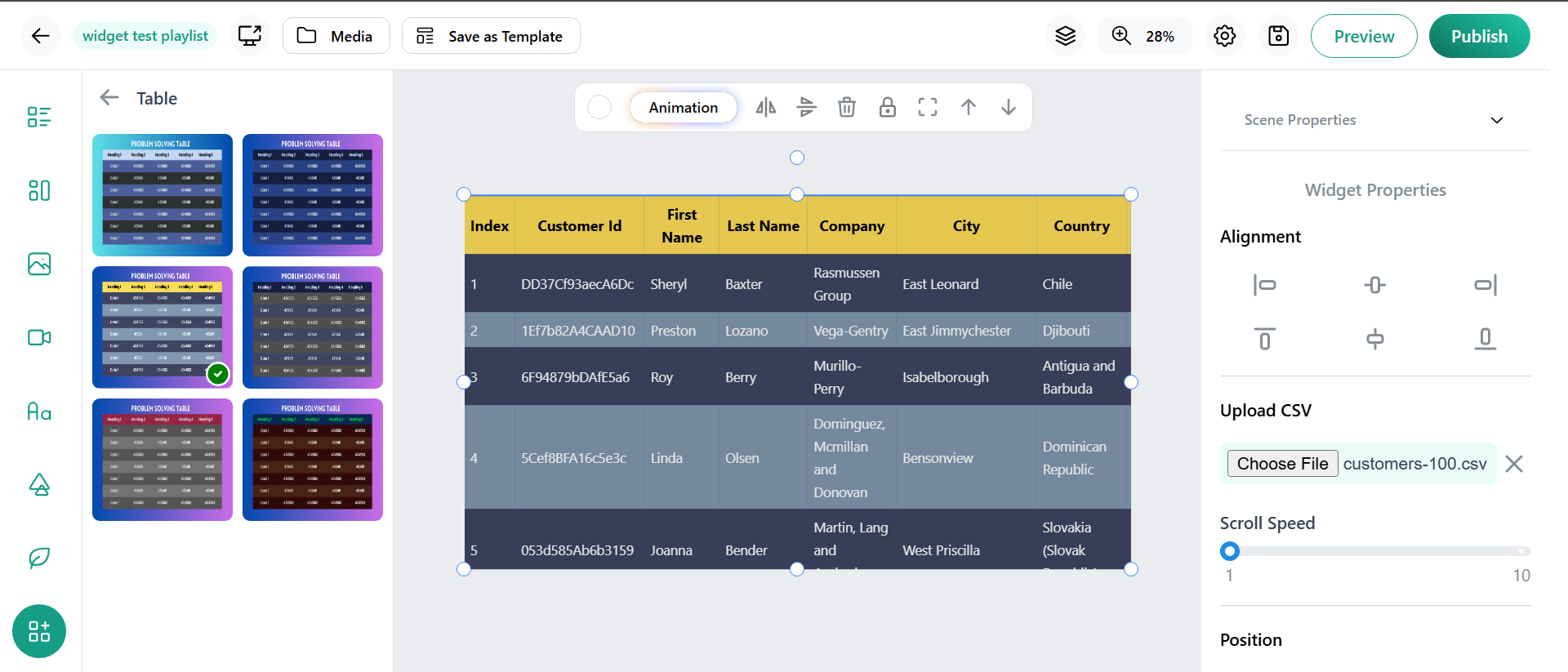
- Choose the Table Widget from the widget library.
- Select a appearence of list in table widget.
- Click to upload your Excel file containing the table data you wish to display.
- Adjust column widths, enable scrolling, and set any filters or sorting parameters.
- View the table display on preview to ensure it meets your visibility and design requirements.
- Deploy the table to targeted screens or groups, ensuring synchronized display.
- Upload revised Excel files anytime to keep information current without disrupting display quality.
Benefits for Businesses and Organizations
- Clear Data Presentation: Allows complex datasets—such as schedules, product lists, or inventory—to be displayed clearly and professionally, improving communication and reducing misunderstandings.
- Time Efficiency: Automates data updates through Excel file uploads or integrations, minimizing manual edits and saving time.
- Enhanced Viewer Engagement: Scrollable and searchable tables help audiences find relevant information quickly, improving user experience.
- Brand Consistency with Theme Options: After selecting the Table Widget, users can choose from multiple available color themes. This capability lets businesses customize table appearance to match their brand identity and signage design, creating a cohesive and attractive display.
- Multi-Screen Uniformity: Ensures consistent data display across multiple branches, offices, or event locations, strengthening messaging cohesion.
- Versatility Across Use Cases: Ideal for schedules, product listings, event information, menu items, and more, supporting diverse business needs.
- Scalability and Easy Maintenance: New data uploads refresh content instantly across all displays, supporting scalable multi-location deployments without technical overhead.
Conclusion
The Table Widget is an indispensable tool for transforming raw data into visually organized, scrollable tables on digital signage screens. By leveraging simple Excel uploads and rich customization features, this widget revolutionizes how businesses present schedules, inventories, or informational lists—delivering clarity, professionalism, and easy navigation to any audience. With seamless updates and multi-screen deployment, the Table Widget ensures your data is always accessible, attractive, and actionable.